


| Icon | Description |
|---|---|
 | This icon indicates that the page is currently published and can be seen by everyone. |
 | This icon indicates that the page is not published on the live site. |
 | This icon appears next to pages that are scheduled to be published in the future. |
| These two icons appear next to pages that already have a published version and another version is scheduled to be published. |
 | This icon appears next to pages that already have a published version and a new version of the page is being created but is not published yet. |
 | This icon appears next to pages that are archived. Archived pages are no longer visible on the live site, but are still present in the content tree and can be restored when needed. You can archive a page by clicking the Archive button on the Properties -> Workflow tab. |
 | This icon indicates that the page is currently checked-out. That means that it is being edited by another user. You cannot edit a page while it is checked out, you have to wait until the user finishes editing and checks the page back in. |
 | This icon appears next to pages that are not available in the currently edited culture. |
 | This icon is displayed next to linked pages. Linked pages only represent a link pointing to another page in the content tree. |
 | Displayed next to pages that are currently being A/B tested. The icon's color indicates the following:
|
How can I publish something for a future date?
Kentico allows you to specify when a page is published. When you edit a page in the Pages application on its Content tab, you can typically find the Publish from/Publish to and Redirect after unpublish fields at the bottom of the form:
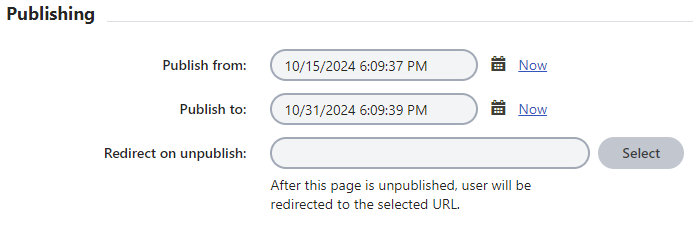
When you set the Publish from/Publish to values, the page will be displayed on the website only during the given time period.
- The system is ahead 5 hours so you will need to add/subtract 5 hours to the initial time
- If you are asked to post something for 8am EST then you need to set it for 1pm
- If you are asked to take something down at 6pm EST then you need to set it for 1pm
- If you do not set the Publish from value, the page is displayed on the live site immediately.
- If you do not set the Publish to value, the page stays published until manually unpublished.
Additionally, in the Redirect after unpublish field you can select a page where visitors are redirected after the page is unpublished.
If the page is outside of the set Publish from/Publish to interval, i.e., the page is not yet published or the Publish to time is in the past, the page stays visible for you in the content tree of the Pages application and behaves as an unpublished page. You can always change the Publish from/Publish to values to republish or unpublish the page.
Note: In order for this to work you will need to publish the page. This will not cause the new version to appear right away. The "scheduled" icon will appear to indicate a new version has been scheduled.
The new version of the page will appear when the date and time provided in the "Publish from" field starts. Once that the new version kicks in, the icon will change to the familiar solid green checkmark only.
How can I unpublish something without deleting it?
There are 2 ways to do this:
- Archiving the page
- Setting a Publish to time. Choosing this option will allow you to set a page redirect once it's unpublished.